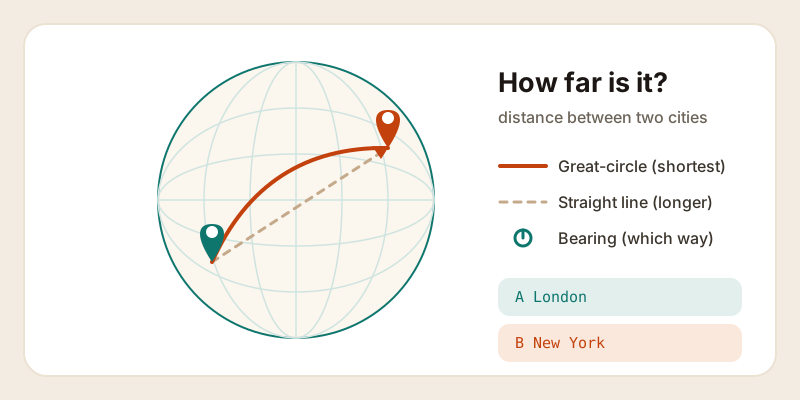
"How far is it from London to New York?" sounds like a question with one tidy answer. But ask a flight tracker, a road-trip planner, and a map app and you will get three different numbers — and all of them can be correct. The distance between two cities depends entirely on how you travel between them. Here is what each number means, why they disagree, and which one you actually want.
Two very different kinds of "distance"
When people talk about the distance between two cities, they usually mean one of two things:
- Great-circle distance — the shortest possible path across the curved surface of the Earth, often called "as the crow flies." This is the straight line a plane roughly follows. It ignores roads, mountains, and oceans entirely.
- Driving (or travel) distance — how far you would actually move along real roads, ferries, and detours to get from one place to the other.
The great-circle distance is always the smaller of the two, because no road can be shorter than the straight line beneath it. The gap between the two numbers tells you how "indirect" the journey is. Across an open plain the two might differ by 15 to 20 percent; through mountains, around a bay, or where you have to backtrack to find a bridge, the driving distance can be far larger.
Great-circle distance: as the crow flies
The Earth is a sphere (very nearly), so the shortest path between two points is not a straight line on a flat map — it is an arc that bends across the globe. That arc is a slice of a "great circle," the largest circle you can draw around a sphere, like the equator. Follow it and you are taking the most direct route the planet allows.
This is why long-haul flight paths look strangely curved on the flat map in your seat-back screen. A flight from the United States to Europe that appears to swing up toward Greenland is not lost — it is following the great circle, which really is shorter than the dead-straight line the flat map suggests. The map is distorted; the arc is honest.
Great-circle distance is the number to reach for when the terrain between two points does not matter to your trip: flights, shipping estimates, radio range, or simply settling a "how far apart are these two cities, really?" debate.
The haversine idea, in plain English
You do not need a calculator the size of a textbook to find great-circle distance. The standard recipe is a tidy formula called the haversine, and the idea behind it is friendlier than the name.
Start with the latitude and longitude of both cities. Latitude tells you how far north or south each one is; longitude tells you how far east or west. The haversine formula takes the differences in those two angles, accounts for the fact that lines of longitude squeeze together as you move toward the poles, and turns the result into an angle measured from the center of the Earth. Multiply that angle by the Earth's radius — about 6,371 kilometers (3,959 miles) — and you have the distance along the surface.
In short, it answers one question: "what fraction of the way around the globe are these two points, and how long is that arc?" The math handles the curve for you. If you want to skip the arithmetic, our distance between cities calculator runs the haversine for you and shows both miles and kilometers, and you can find the exact latitude and longitude of any place first with our GPS coordinates finder.
Bearing: not just how far, but which way
Distance tells you how far; bearing tells you which direction. A bearing is the compass heading from your starting point toward your destination, written as degrees from north: 0° is due north, 90° due east, 180° due south, 270° due west.
There is one quirk worth knowing. On a great-circle route, the bearing changes as you go. Set off from London toward New York and your initial heading points well north of due west — yet you arrive heading roughly southwest. That gradual turn is the curve of the great circle in action, and it is exactly why pilots and ship navigators recompute their heading along the way rather than locking in a single compass direction.
Why your map apps disagree
Open two navigation apps, search the same trip, and you will often see different distances. None of them is broken. They disagree because they are answering slightly different questions:
| What differs | Why the number changes |
|---|---|
| Route choice | One app favors highways, another the shortest path or the one avoiding tolls — each is a different real-world distance. |
| Where the "city" is | A "city" is an area, not a dot. Apps may measure to the city center, the main station, or a default pin, and those points are miles apart. |
| Live conditions | Closures, construction, and traffic reroute the path, nudging the distance up or down. |
| Straight-line vs roads | A simple "as the crow flies" tool and a turn-by-turn router are computing two genuinely different distances. |
So before comparing two numbers, check that they are even measuring the same thing. A great-circle tool and a driving router will never match — and they are not supposed to.
Which number do you actually want?
Match the distance to the trip:
- Flying? Use great-circle distance. It closely tracks the actual air route and is the basis for flight times and frequent-flyer miles.
- Driving or cycling? Use driving distance from a routing app. The straight-line figure will badly underestimate a journey around coastlines, lakes, or mountains.
- Comparing two cities in the abstract? Great-circle is the fair, consistent answer — it does not depend on which roads happen to exist.
- Planning arrival times across regions? Distance is only half the story. Crossing time zones can shift the clock by hours, so check the local time at your destination with our time in a place tool before you book.
Once you know which question you are asking, the right number falls out naturally. For a quick "how far apart are these two places," start with the distance between cities calculator — pick your two cities, and it gives you the great-circle distance, the bearing, and the units you prefer in one tap.