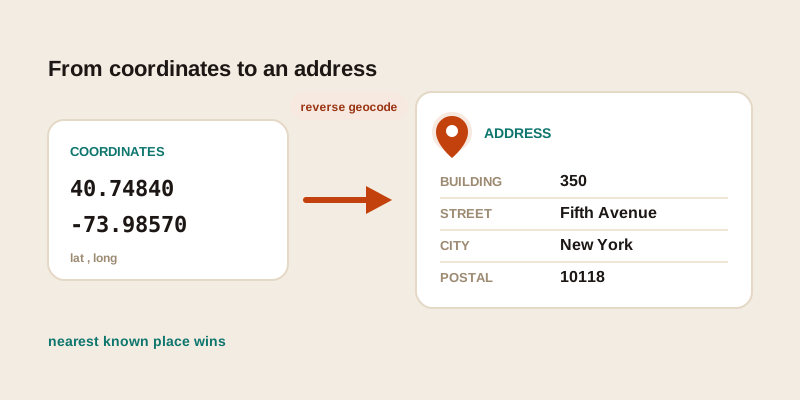
You have a pair of numbers, maybe pulled from a photo, copied off a dropped pin, or buried in a fleet tracker's log, and what you actually want is a place you can name out loud. "Where is 40.7484, -73.9857?" turns out to be the Empire State Building. Going from raw coordinates back to a human-readable street address is called reverse geocoding. Here's how it works from your side of the screen: what you paste in, what you get back, and why the answer is sometimes a crisp address and sometimes a vague "near the highway."
What reverse geocoding actually does
Ordinary geocoding goes one direction: you type an address and a service hands back a latitude and longitude. Reverse geocoding runs the same machinery backwards. You give it a coordinate pair, and it searches a map database for the closest known address, road, or place and describes it in words.
The key thing to understand is that it's a nearest-match lookup, not a precise reading off a label. Coordinates point at an exact spot on the ground, but the ground itself rarely carries a printed address. So the service asks a different question: "Of everything in my database, what is closest to this point, and how should I phrase it?" Most of the time the closest thing is a building or a road, and you get a tidy answer. Sometimes the closest thing is far away, and the answer gets fuzzy.
This is why two services can return slightly different addresses for the very same coordinates. They're not disagreeing about where the point is — they're drawing from different maps and different rules about what counts as the "best" nearby match.
Where the numbers usually come from
People rarely sit down and decide to reverse geocode something. It almost always starts with coordinates that arrived from somewhere else. The common sources:
- Photo EXIF data. Phones and many cameras stamp the GPS location into each photo's hidden metadata. Pull a picture into a viewer that reads EXIF and you'll often find a latitude and longitude but no place name — reverse geocoding fills in the "where was this taken."
- Dropped pins. Someone long-presses a map, drops a pin in the middle of a field or a parking lot, and shares the coordinates. There may be no address attached because the spot isn't a registered building.
- Device and fleet logs. Trackers, dashcams, delivery apps, and IoT sensors record position as bare numbers at intervals. A log full of
lat, longrows only becomes readable once each row is turned back into a street and city. - Copied or forwarded coordinates. A friend texts you a pair of numbers, or you find them in a listing, a forum post, or a spreadsheet, and you'd rather see a real address before you act on it.
If you simply want to know your own spot right now rather than decode someone else's numbers, the where am I tool reads your device's location and shows both the coordinates and the matching address in one step.
The parts of an address you get back
A reverse geocode result is rarely just one string. Underneath, it's assembled from components, and a result can include some, all, or only a few of them depending on how much the map knows about that location.
| Component | Example | How reliable it usually is |
|---|---|---|
| Building / house number | 350 | Most likely to be missing or estimated |
| Street | Fifth Avenue | Good in towns and cities, sparse in the countryside |
| Neighbourhood / district | Midtown | Varies a lot by region |
| City / town | New York | Usually reliable |
| Postal code | 10118 | Reliable in dense areas, broad or absent in rural ones |
| Region / state | New York | Almost always present |
| Country | United States | Effectively always present |
Notice the pattern: the broad components are dependable, the narrow ones are not. A service can almost always tell you the country and region a point falls in, because those are large areas with clear boundaries. The exact house number is the hardest part, because it depends on a specific building being mapped and on your coordinates landing close enough to it.
When you only need the postal code rather than the full address — say, to estimate shipping or check a delivery zone — a focused postal code lookup is often cleaner than parsing a whole address string.
Why results turn fuzzy or come back empty
If a reverse geocode ever feels wrong or weirdly vague, it usually isn't a glitch — it's the nearest-match logic running into a thin patch of the map. Here are the situations that trip it up most often.
Nearby buildings steal the answer
In a dense block, your point might sit on a courtyard, an alley, or the gap between two structures. The service picks the closest mapped building, so you can get the neighbour's address instead of the one you meant. The result looks confident and precise — it's just attached to the wrong door. A few metres of GPS drift is enough to cause this in tightly packed areas.
Rural roads have little to match against
Out in the countryside, there may be no house numbers for miles and only a single named road nearby. A point on a long rural lane often resolves to something like "near County Road 12" with the number left blank, or it snaps to the nearest village centre. That's not the service failing; there simply isn't a finer-grained address to return.
Water, parks, and empty land return almost nothing
Drop a point in the middle of a lake, the open sea, a desert, or a large park and there may be no street, building, or postal code anywhere close. You'll get a region and country at best, sometimes the name of the body of water, and often an empty or very short result. There's genuinely no address there to find.
The coordinates themselves are imprecise
Reverse geocoding can only be as accurate as the numbers you feed it. The digits after the decimal point matter: roughly five decimal places lands you within about a metre, three places only within a hundred metres or so. If a coordinate was rounded, mistyped, or had its latitude and longitude swapped, the lookup will faithfully describe the wrong spot. Always sanity-check that latitude comes first and that the signs (or the N/S/E/W letters) are intact before trusting the address.
Getting a clean address from a coordinate pair
The mechanics are simple once you know what to watch for. A reliable routine looks like this:
- Confirm the order. Latitude first, longitude second. If the address comes back on the wrong continent, the two are almost certainly reversed.
- Keep every character. A dropped minus sign flips a hemisphere; a trimmed decimal place can move you across town. Paste the pair exactly as you found it.
- Paste and read the components. Drop the pair into the GPS to address tool and look at the full breakdown — street, city, postal code, country — rather than just the single headline line.
- Judge the result against its surroundings. A precise house number in a dense city is trustworthy. A blank street in open country or water is expected, not broken.
- Cross-check when it matters. If you're acting on the address — dispatching someone, filing a record — verify a fuzzy result against a second source before relying on it.
Going the other way, from a name or address to coordinates, is the mirror image of this process. Our companion guide on how to find the GPS coordinates of any place covers that direction in detail, including how to read decimal degrees versus DMS and how to share a pair without mangling it.
Putting it together
Reverse geocoding is really just a question — "what's the closest named place to this point, and how do I say it?" — and the answer is only ever as good as the map and the coordinates behind it. In a city you'll usually get a crisp street address; on a rural road you'll get the road but maybe no number; over water or empty land you'll get little more than a country. None of that is a malfunction. Once you expect the broad parts to be solid and the narrow parts to be best-effort, the occasional fuzzy result stops being a surprise and starts being information about the place itself.
Have a pair of numbers waiting to be decoded? Paste them into the GPS to address tool and you'll get the street, city, and postal code labelled out — and if you'd rather find coordinates from an address instead, the find GPS coordinates tool runs the same idea in reverse.