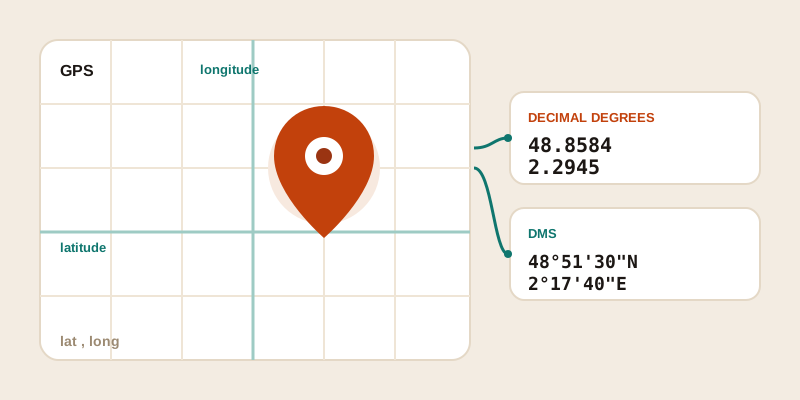
Sometimes a street address just isn't enough. Maybe you want to mark the exact trailhead, not the parking lot half a mile away. Maybe you're sending a friend to a campsite that has no address at all, or pinning the precise corner of a building for a delivery. In all these cases, what you really want are GPS coordinates — a pair of numbers that points to one specific spot on Earth. Here's how to find the coordinates of any address or place, how to read the numbers, and how to copy and share them so they actually work for the person on the other end.
What GPS coordinates actually are
Every point on the planet can be described by two numbers: latitude and longitude. Together they form a coordinate pair that's as unique as a fingerprint for that location.
- Latitude tells you how far north or south you are, measured from the equator. It ranges from -90 (the South Pole) to +90 (the North Pole). A positive number is north; a negative number is south.
- Longitude tells you how far east or west you are, measured from the Prime Meridian that runs through Greenwich, London. It ranges from -180 to +180. A positive number is east; a negative number is west.
By long-standing convention, latitude is always written first, then longitude. So a coordinate like 40.6892, -74.0445 means 40.6892 north and 74.0445 west — the Statue of Liberty. Get the order backwards and you can end up on the wrong continent, so it's worth committing "lat, then long" to memory.
Searching by name vs by address
There are two ways to ask for coordinates, and knowing which one to use saves a lot of frustration.
Searching by name works when a place is well known — "Eiffel Tower," "Yellowstone National Park," "Sydney Opera House." A search tool recognizes the name and drops a pin on the landmark itself. This is the fastest route for famous spots, but it can be ambiguous: there are dozens of "Main Street Cafes" in the world, and a bare name like that might land you in the wrong town.
Searching by address is more precise for everyday locations. A full street address — number, street, city, and ideally a postal code — narrows things down to a single building. If you have it, use the complete address rather than just a business name. The more detail you provide, the less guessing the tool has to do.
A few habits make either search more reliable:
- Add the city and country when a name might be common ("Cambridge, UK" vs "Cambridge, Massachusetts").
- Include the postal code if you have one — it resolves a surprising number of ambiguous addresses.
- For rural or address-free spots (a beach, a viewpoint, a trail junction), search for the nearest named landmark and then nudge the pin to the exact place.
Our find GPS coordinates tool handles both styles — type a landmark, a full address, or a partial place name and it returns the latitude and longitude with a pin you can fine-tune.
Reading the numbers: decimal degrees vs DMS
Coordinates show up in two common formats, and they describe the exact same point — just written differently.
| Format | What it looks like | Best for |
|---|---|---|
| Decimal degrees (DD) | 48.8584, 2.2945 | Apps, websites, copy-and-paste, spreadsheets |
| Degrees, minutes, seconds (DMS) | 48°51'30"N, 2°17'40"E | Navigation, marine and aviation charts, paper maps |
Decimal degrees is the modern default. It's just two plain numbers, so it copies cleanly into almost any field and is easy to store. The digits after the decimal point control precision: roughly speaking, five decimal places gets you to about a meter, which is more than enough for everyday use.
DMS splits each degree into 60 minutes, and each minute into 60 seconds, the same way an hour is divided. It reads more like a traditional map reference and includes N/S/E/W letters instead of plus or minus signs. You'll mostly meet it on nautical charts and in older navigation gear.
If you ever need to translate between the two, the conversion is straightforward arithmetic, but it's easy to slip a digit. For a deeper walk-through of both formats, see our guide on how the two compare — and remember that any good coordinate tool will show you both at once so you never have to convert by hand.
Getting coordinates on your phone or computer
The steps differ slightly by device, but the idea is the same everywhere: find the place, then read off its latitude and longitude.
On a phone (iPhone or Android)
The quickest path to your own location is a browser tool. Open the "where am I" tool and allow location access when prompted — it reads your phone's GPS and shows your exact coordinates, address, and accuracy in one tap. To get coordinates for another place, open the find coordinates tool and type the address or landmark; you can then drag the pin to fine-tune the spot before copying the numbers.
Most built-in map apps can also surface coordinates: tap and hold on the exact spot to drop a pin, then look in the place card or info panel for the latitude/longitude line.
On a desktop or laptop
On a computer, a browser tool is usually the cleanest option because you can see the full address breakdown and both coordinate formats side by side. Search by name or address, confirm the pin is on the right spot, and copy the pair. There's no app to install and nothing is stored — the lookup happens right in your browser.
Copying and sharing coordinates the right way
Finding coordinates is only half the job; the other half is getting them to someone else without errors. A few simple rules keep things clean:
- Copy the whole pair together. Send "48.8584, 2.2945" as one unit so the order is obvious and nothing gets dropped.
- Keep the sign or the letter. A missing minus sign (or a missing "W") can flip you to the opposite hemisphere. Don't trim them off to look tidier.
- Pick one format and stick with it. If you're sharing decimal degrees, don't mix in DMS in the same message — it confuses the recipient and any tool they paste it into.
- Say what the coordinates are for. "Meet me here: 48.8584, 2.2945 (the cafe on the corner)" is far more useful than bare numbers.
If someone sends you coordinates and you'd rather have a readable street address, paste them into our GPS to address tool. It does the reverse of finding coordinates — turning a latitude/longitude pair back into a full formatted address with the road, city, and country labelled out.
Putting it all together
Coordinates feel technical at first, but the system is simple once it clicks: latitude first (north/south), longitude second (east/west), in either decimal degrees or DMS. Search by a well-known name when you can, fall back to a full address when names are ambiguous, and always double-check the pin before you copy. Do that and you can pin any place on Earth — even one with no address at all — and hand it to someone with confidence.
Ready to try it? Drop a name or address into the find GPS coordinates tool and you'll have a clean, shareable latitude and longitude in seconds.