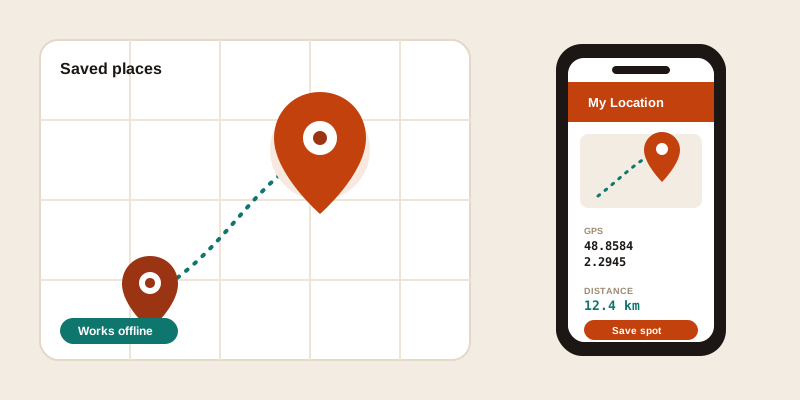
The tools on this site are built for the moment you're sitting somewhere with a keyboard: looking up the coordinates of a place, checking the distance between two cities before you book, or working out what time it is where you're headed. That's the planning half of travel. The other half happens on your feet, with one hand free and a phone in the other — and that's exactly where a dedicated app earns its place.
My Location is a free Android app from the same family as this site. Think of it as the on-the-go upgrade to the web tools: the same job of finding, understanding and reaching a place, but designed for a phone screen, a moving person, and a patchy signal. Here's what it does well and when you'll reach for it instead of a browser tab.
Find any place by name or address
Most of the time you don't have coordinates — you have a name or a half-remembered address. "That ramen place near the station." "The cottage on Booking, somewhere outside Galway." "Trailhead for the blue route." The app starts where you actually start: type what you know, and it resolves it to a real point on the map.
Searching by name is fastest for anything well known — a landmark, a park, a named business. Searching by address wins when you need a specific door rather than a general area; the more detail you give it (street number, city, postal code), the less guessing it has to do. If the place has no address at all — a viewpoint, a beach, a campsite — search the nearest named spot and then nudge the pin to the exact place. It's the same logic as our find coordinates tool, just in your pocket.
Read the exact GPS coordinates
Once you've found a place, the app shows its exact latitude and longitude — the pair of numbers that points to one specific spot on Earth, unambiguous in any country and any language. That matters more often than you'd expect while travelling:
- You're meeting friends at a spot that has no clean address, and a coordinate pair lands them on the exact corner rather than "somewhere on this street."
- A host sends you "we're 200m past the church" — you want to turn that into a fixed point you can navigate back to.
- You found a quiet beach today and want to be able to return to the precise spot next year.
Coordinates travel better than screenshots. They paste into any maps app, survive being sent over plain text, and never depend on a particular service being installed on the other person's phone. Reading them off your own current position is a one-tap version of the where am I tool; reading them off a place you searched is the address-and-coordinates lookup, made portable.
Get My Location free on Google Play and keep coordinates one tap away wherever you are.
See how far it is and how long to get there
Distance is the question every trip turns on. Is that day-trip town close enough to be worth it? Can you reach the next campsite before dark? The app lets you measure the gap between where you are and where you're going, so you can make the call without doing mental arithmetic on a map.
Two numbers tell different stories, and it helps to know which you're looking at. Straight-line (as-the-crow-flies) distance is the honest minimum — useful for "is this even in range." Travel time is what you actually plan around, because a short distance over a mountain pass can eat an afternoon while a long flat motorway run vanishes. The web version of this thinking lives in our distance between cities tool; on the road, having it in your hand means you can re-plan the moment things change.
Drop a pin and save the places you want to revisit
This is the feature that turns a lookup tool into a travel companion. As you go, you can drop a pin on anything worth remembering and save it — not just search for it once and lose it when you close the app.
Over a trip, those saved spots become your own private map: the café with the good coffee, the parking spot you'll never find again otherwise, the lookout the guidebook missed, the apartment you're renting, the pharmacy that was open late. Each one keeps its coordinates, so you can navigate straight back or share the exact location with whoever you're travelling with. It's the difference between "I think it was down one of these side streets" and tapping a pin you saved three days ago.
A few habits make saved places genuinely useful:
- Save it the moment you find it, while you're standing there — that's when the pin is most accurate and you're least likely to forget.
- Give it a name you'll recognise later ("blue-door guesthouse," not "place 14").
- Save your accommodation first thing on arrival, so "home for now" is always one tap away when you're tired and lost.
It keeps working offline
Here's the part a browser tab can't match. Travel is exactly when your connection is worst — a foreign SIM you haven't sorted, a dead zone in the mountains, a basement metro station, an airplane-mode flight. A website needs the network at the moment you ask. An app can hold onto what you've already loaded.
Your phone's GPS chip doesn't need mobile data to work — it talks to satellites directly, so the app can still read your current coordinates with the data switched off. Your saved pins stay on the device, so the places you marked are there whether or not you have signal. That combination is the whole point: you can be deep in a national park with no bars and still know where you are, how far the trailhead is, and which way back to the car.
It's worth being realistic about the limits. Fresh map tiles and a brand-new address lookup do need a connection at some point — offline means "what you've already got keeps working," not "the whole internet in your pocket." Plan the data-hungry parts (searching unfamiliar places, loading a new area's map) while you still have signal, and the offline pieces — your position, your saved spots, your distances — carry you through the gaps.
Web tools or the app — which when?
They're two halves of the same toolkit, and the answer is "both, for different moments."
Reach for the web tools on this site when you're planning at a desk: comparing several destinations, reading a place's country facts before you book, checking a postal code for a form, looking up the elevation of a hike, or sorting out time differences across several cities at once. A big screen and copy-paste are perfect for that.
Reach for the My Location app when you're moving: standing somewhere and needing your exact coordinates, saving a spot before you forget it, measuring how far the next stop is, or pulling up your map when the signal has vanished. Same family, same philosophy — privacy-first, no fuss — just shaped for the part of travel that doesn't happen at a desk.
If you spend any real time away from home, the app is the piece that makes the rest of these tools follow you out the door. Download My Location free on Google Play and start saving the places worth coming back to.