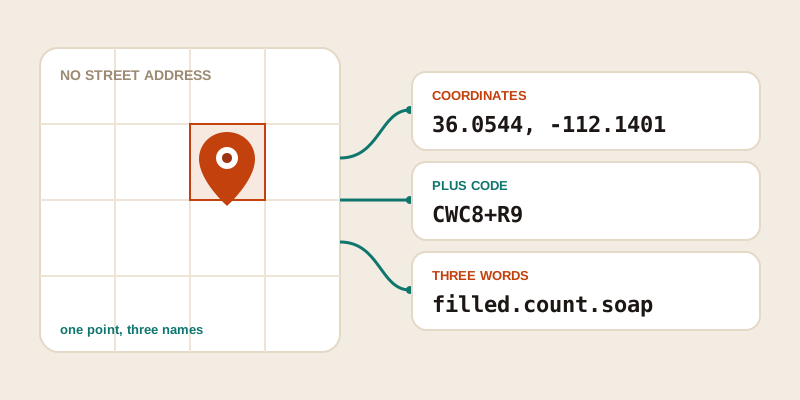
Some of the most worth-sharing places on Earth don't have a street address. A trailhead at the edge of a forest, a campsite by a lake, the exact gate where a festival lets cars in, the spot on a long driveway where the delivery should actually go — none come with a tidy "number, street, city" you can text to a friend. There are four real ways to name a place with no address: raw GPS coordinates, Google Plus Codes, what3words, and the humble approach of borrowing the nearest landmark. Here's what each is good at, where each falls down, and how to turn a pin on a map into something you can paste into a message.
Why a street address often isn't enough
Street addresses were built for buildings on roads. They work beautifully for "deliver this parcel to the front door" and fall apart almost everywhere else. The moment you step off the road network — into a park, a stretch of coast, farmland, or even a large car park — the address either doesn't exist or points to the wrong spot.
There are a few classic failure modes:
- No address exists at all. A viewpoint, a fishing spot, a remote cabin, a desert meeting point — there was never a number assigned.
- The address is too coarse. A 200-acre farm has one address, but you need the specific gate. A beach has a name, but you mean the rock pools at the north end.
- The address routes to the wrong place. Many big sites center the map on the main entrance, the office, or the geographic middle, leaving the recipient circling a building looking for you.
For all of these, you want to share a point, not a postal address. The systems below all do that — they just package the same point in different ways.
Option 1: Raw latitude and longitude
The original, universal way to name a point is a pair of numbers: latitude (how far north or south) and longitude (how far east or west). Written as decimal degrees, a coordinate looks like 36.0544, -112.1401 — that's a rim viewpoint at the Grand Canyon. Latitude always comes first, then longitude.
Coordinates are the closest thing to a lingua franca for location. Every map app, GPS unit, drone, and surveying tool understands them, and they don't depend on any single company's service staying online. If you paste a clean pair into almost any maps search box, it drops a pin.
Where they shine:
- Universal. No app, account, or proprietary database required — they're a mathematical description of a point, not a product.
- Precise as you like. Each extra decimal place tightens the pin. Five decimals lands you within about a meter; that's finer than most addresses.
- Offline-friendly. Your phone's GPS produces coordinates with no signal at all, and a saved coordinate works forever.
Where they struggle:
- Easy to mangle. Drop a minus sign and you flip hemispheres; swap the order and you land on another continent.
- Hard to say out loud. Reading "minus one hundred twelve point one four oh one" over a noisy phone line is asking for errors.
- Not memorable. Nobody recalls a coordinate the way they recall a word or two.
To grab the coordinates of a spot, search a landmark or address in our find GPS coordinates tool and nudge the pin to the exact point, or tap the "where am I" tool to read your own position. If you'd like the full mechanics — decimal degrees versus DMS, and how to share a pair without errors — our companion post on finding the GPS coordinates of any place goes deep.
Option 2: Google Plus Codes (Open Location Code)
A Plus Code is a short, address-like code derived directly from latitude and longitude. The system, also called Open Location Code, was created by Google and released as open source, so anyone can encode or decode a code without permission or an account. A full code looks like 849VCWC8+R9, and you can shorten it by pairing it with a town name, e.g. CWC8+R9 Mountain View.
The clever part is that the code is the location — there's no lookup table mapping codes to places. The characters encode a grid square, and adding more characters shrinks that square. A 10-character code (plus the "+") describes a square roughly 14 by 14 meters; add one more character and you're down to a few meters.
Where Plus Codes shine:
- Open and free. The algorithm is public, so codes aren't locked to one paid service.
- Self-contained. A code converts straight back to coordinates with no database, which means it can be decoded offline once you have the (small) open-source logic.
- Shorter than coordinates. The town-paired form ("CWC8+R9 Mountain View") is easier to text and type than two long decimals.
- Built into Google Maps. Search a Plus Code there and it resolves directly.
Where they struggle:
- Still a bit cryptic. The characters are deliberately not real words, so they're not especially memorable or easy to dictate.
- The short form needs context. Drop the town name and a shortened code is ambiguous.
- Recognition varies. Some apps and people simply haven't met them yet.
Option 3: what3words
what3words takes a different tack: it divides the entire world into a grid of 3-meter-by-3-meter squares and gives each square a unique combination of three dictionary words, like filled.count.soap. The promise is that three ordinary words are far easier to say, remember, and type without error than a string of digits.
The appeal is real for spoken and human-to-human sharing. "Meet me at filled dot count dot soap" survives a phone call better than a coordinate, and the words are chosen so that similar-sounding squares are placed far apart, reducing the chance a small slip lands you nearby by accident.
Where what3words shines:
- Human-friendly. Three words are easy to read aloud, remember briefly, and type on a phone.
- Fixed, fine precision. Every address is the same 3 m square — no decimal-place fiddling.
- Multilingual. The same square can be expressed in many languages.
Where it struggles:
- Proprietary. The word-to-square mapping is owned by one company; converting a three-word address requires their service or app, which is the opposite of the open coordinate and Plus Code approach.
- Needs a lookup. Unlike coordinates and Plus Codes, you can't decode three words with arithmetic — you need their database, which has implications if that service ever changes or goes away.
- Similar words, different places. The system tries hard to keep look-alikes apart, but a single wrong word still points somewhere else entirely, so accuracy on the spelling really matters.
- Less universal. Many map apps and GPS units won't accept three words directly; the recipient often needs the specific app.
Side-by-side comparison
Here's how the four approaches stack up for the everyday job of sending someone to a precise, address-free spot.
| System | Looks like | Typical precision | Open or proprietary | Works offline to decode? |
|---|---|---|---|---|
| Lat / long | 36.0544, -112.1401 | ~1 m at 5 decimals | Open standard | Yes |
| Plus Code | CWC8+R9 Mountain View | ~14 m (longer = finer) | Open source | Yes |
| what3words | filled.count.soap | Fixed 3 m square | Proprietary | No (needs lookup) |
| Nearest landmark | "north end of Long Beach car park" | Vague to good | Open (it's just words) | Yes |
A quick rule of thumb: coordinates are the safest choice when you don't know what tools the other person uses, because nearly everything accepts them. Plus Codes are a great middle ground — shorter than coordinates but still open and offline-decodable. what3words wins when a human has to say the location out loud and the recipient already uses the app. And never underestimate a good landmark description as a backup: pairing any code with "it's the gate just past the red barn" rescues the share if the technology fails.
How to turn a pin into something you can share
Whichever system you prefer, they all start from the same place: a single point on a map. The reliable workflow is to fix that point first, then express it however the recipient needs.
- Find the exact spot. Open our find GPS coordinates tool, search the nearest landmark, road, or place name, and drag the pin precisely onto the trailhead, gate, or campsite. If you're standing there already, the "where am I" tool reads your live position.
- Copy the coordinate pair. This is your universal, future-proof reference. Keep the sign or the N/S/E/W letter, and send latitude first.
- Convert if you need a friendlier form. Paste those coordinates into Google Maps to read off a Plus Code, or into the what3words app to get three words. Because both are built from the same lat/long, you can always regenerate them from the coordinate later.
- Add a human note. Whatever code you send, append a sentence of plain context: "park here, then walk 5 minutes down the dirt path." It costs nothing and saves the day when signal drops.
If someone sends you a coordinate or you want to sanity-check where a pin actually lands, our GPS to address tool does the reverse — it turns a latitude/longitude pair back into the nearest readable address, so you can confirm you're sending people to the right neighborhood before they set off.
Which one should you use?
There's no single winner, because the best system depends on who's receiving the location and how. For maximum compatibility and longevity, share coordinates — they're open, precise, and understood everywhere. For a shorter code that's still open and easy to text, reach for a Plus Code. When the handoff is spoken or the other person already lives in the what3words app, three words are genuinely easier on the ear. And in every case, a sentence of landmark context is the cheapest insurance you can buy.
Ready to pin a place that has no address? Start in the find GPS coordinates tool — drop a pin on the exact spot, copy the coordinates, and you'll have a clean, universal location you can convert into a Plus Code or three words whenever the moment calls for it.