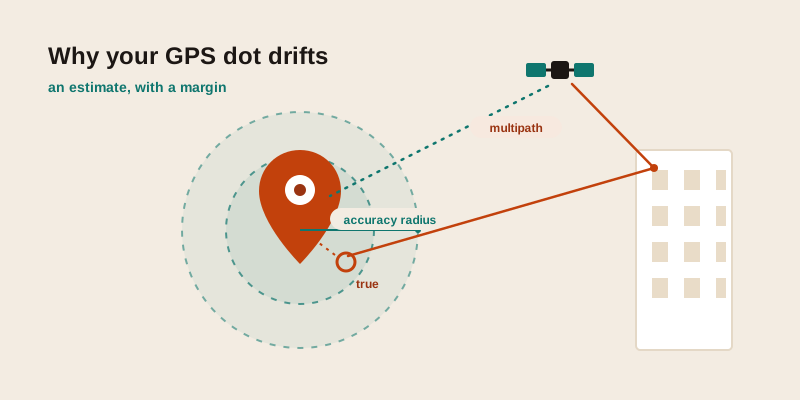
Your phone insists you're standing in the river. The map dot drifts a block behind you, then jumps to the next street over. You're not imagining it, and your phone isn't broken — GPS is an estimate, not a measurement, and a handful of very ordinary conditions can push that estimate off by anywhere from a few metres to a few hundred. Here's why it happens, how accurate phone GPS really is, and the concrete steps that fix the common cases.
GPS gives you a guess with a margin, not a fixed point
A satellite-positioning fix is the answer to a timing puzzle. Your phone listens for signals from several satellites overhead, measures how long each one took to arrive, and works out the single spot on Earth where all those distances agree. With four or more clean signals it can solve for latitude, longitude, and altitude at once.
The catch is that every input to that puzzle carries a little uncertainty — the satellite's exact position, tiny clock differences, and especially how cleanly each signal reached you. So the device doesn't return a perfect point. It returns a best estimate plus a confidence radius: "I'm fairly sure you're within this many metres of here." That radius is the blue circle around your dot, and understanding it is the key to everything that follows.
What the accuracy radius actually means
When an app reports your location, it almost always reports an accuracy figure alongside it — you just rarely see it. That number is a radius in metres, and it's a probability statement, not a guarantee. A reported accuracy of 10 metres means roughly "your true position is most likely within 10 metres of the dot," not "you are exactly 10 metres away" and certainly not "you are exactly on the dot."
Two practical consequences fall out of this:
- A small radius can still be wrong. "Most likely" leaves room for the occasional miss. A tight 5-metre circle is usually trustworthy, but it isn't a promise.
- A large radius isn't a malfunction. A 1,500-metre circle indoors signals how little the system currently knows — which is far more useful than a confident dot in the wrong place.
The first habit to build: when a location looks off, look for the accuracy radius before you blame the device. A wide circle is the system telling you not to trust the centre yet.
How accurate is phone GPS, really?
Under an open sky with a clear view of the horizon, a modern phone typically settles to within a handful of metres. Conditions degrade that quickly, and the table below is a realistic field guide rather than a spec sheet — treat the figures as typical ranges you'll actually encounter, not hard limits.
| Where you are | Typical accuracy | Why |
|---|---|---|
| Open field, clear sky | A few metres | Many satellites in clean view, little to interfere |
| Suburban street | Roughly 5-15 metres | Some signal blocked or bounced by houses and trees |
| Dense city centre | Tens of metres, sometimes more | Tall buildings block sky and bounce signals (multipath) |
| Inside a building | Often 50 metres to hundreds | Roof and walls smother satellite signals; phone falls back to Wi-Fi/cell |
| Underground / deep indoors | Position may be unavailable | No satellite reception at all |
Notice the theme: accuracy is mostly about what's between you and the sky. The chip in a modern phone is excellent. The environment is what limits it.
The usual culprits behind a wrong location
Urban canyons and multipath
Tall buildings cause two problems at once. They block the satellites low on the horizon, leaving the phone fewer signals to triangulate from. Worse, they act like mirrors: a signal can bounce off a glass tower and reach your phone a fraction of a second late, having travelled a longer path. The phone reads that delay as extra distance and places you off to one side. This bounced-signal error is called multipath, and it's the main reason a city dot can sit a full street away or drift while you stand still.
Indoors and under cover
Satellite signals are faint by the time they reach the ground, and a roof, concrete, or even heavy tree canopy is enough to smother them. Indoors, the phone usually can't get a satellite fix at all and switches to other methods — which is why the dot indoors often lands on the building next door or the centre of the block rather than your actual room.
A cold start with no fresh data
To lock on quickly, a phone needs to know where the satellites currently are. After a long flight, a battery pull, or days switched off, that data is stale and the first fix can be slow and rough — a "cold start." For a minute or two the dot may be wildly off before it snaps into place. This is normal and resolves itself once the phone catches up.
Bad weather, solar activity, and the atmosphere
Signals slow slightly as they pass through the ionosphere and lower atmosphere, and the phone corrects for an average amount of this. Unusual atmospheric or solar conditions can push the real delay away from that average, nudging accuracy down. The effect is modest compared to buildings and roofs, but it's real, and it's why an open field isn't always pinpoint either.
Reflections off the ground and big surfaces
Multipath isn't only a skyscraper problem. Large parking lots, water, snow, and the side of a single big building can all bounce signals enough to wobble a fix even in otherwise open terrain.
GPS isn't the only thing placing your dot
Most phones don't rely on satellites alone. They blend several positioning methods and pick whichever is best at that moment, which explains why the dot sometimes behaves in ways pure GPS wouldn't.
| Method | How it locates you | Strength & weakness |
|---|---|---|
| Satellite (GPS/GNSS) | Timing from satellites overhead | Best outdoors; struggles indoors and among tall buildings |
| Wi-Fi positioning | Matches nearby Wi-Fi networks against a database of known network locations | Excellent indoors and in cities; useless where no mapped networks exist |
| Cell-tower | Estimates from which towers you can reach | Works almost anywhere with signal, but coarse — often hundreds of metres |
Two things follow from this blend. First, turning Wi-Fi on usually improves accuracy even when you're not connected to a network, because the phone uses nearby networks as landmarks. Second, a stale Wi-Fi entry is a classic source of a confidently-wrong dot: if a database thinks a router still lives at its old address, your phone can land you in the wrong city entirely. That's the signature of a placement that's way off rather than just a little fuzzy.
Concrete fixes, from quickest to last resort
Work down this list; most wrong-location problems clear up in the first few steps.
- Get a clear view of the sky. Step outside, away from walls and overhangs. The single biggest accuracy gain costs nothing.
- Wait 30-60 seconds. Let the dot settle, especially after travel or a restart. The first fix is often the worst one.
- Turn Wi-Fi and Bluetooth on. Even without connecting, they feed the phone extra landmarks. Counter-intuitive, but it helps — particularly in cities and indoors.
- Enable the high-accuracy / precise-location setting. Both major phone platforms have a mode that combines satellites, Wi-Fi, and cell. Make sure it's on, and that the specific app is allowed precise (not just approximate) location.
- Toggle airplane mode off and on, or restart. This forces a fresh fix and clears a stuck or stale position.
- Move a few metres. Stepping out of a multipath shadow — away from one building face — can snap a drifting dot into place.
- Check the date and time are automatic. Positioning leans on precise timing; a badly wrong clock can break fixes.
- Re-sync if the dot is in the wrong city. A far-off placement usually means stale Wi-Fi data, not GPS. Toggling Wi-Fi and giving the satellites a clear sky lets the device correct it.
Sanity-check a coordinate before you trust it
Whether the numbers came from your phone or from someone else, a quick gut-check catches most bad readings before they cause trouble.
- Latitude first, longitude second. Swap them and you can leap to the wrong continent. Latitude runs from -90 to 90; longitude from -180 to 180. If the first number's magnitude is above 90, the pair is reversed.
- Mind the signs. A dropped minus flips a hemisphere — south becomes north, west becomes east. Verify the N/S/E/W or the +/- survived any copy-paste.
- Watch the decimal places. Precision lives after the decimal point: about five places pins you to roughly a metre, three places only to about a hundred metres, two places to the wrong part of town. A rounded coordinate isn't wrong, just blunt.
- Does the place make sense? Drop the pair into a map. If "home" lands in the ocean, suspect a swapped or sign-flipped value before you suspect the satellites.
If you want to see this in action with your own position, the where am I tool shows your current coordinates and the matching address together, so you can immediately judge whether the fix looks right. To pressure-test a specific pair of numbers, paste them into the find GPS coordinates tool, and to turn a coordinate into a readable street so you can confirm it points where you expect, use the GPS to address tool.
Putting it together
GPS being "wrong" is almost always GPS being honest about a hard situation: signals blocked by a roof, bounced off a tower, or filled in by a stale Wi-Fi guess. The fixes are mostly about geometry — give the chip a clear view of the sky, let it settle, and switch on the helpers that fill the gaps indoors. And once the dot looks reasonable, the accuracy radius and a quick coordinate sanity-check tell you whether to trust it or wait a beat.
Curious how close your phone is right now? Open the where am I tool to read your live coordinates and address, and if you'd like to understand the numbers themselves more deeply, our guide on how to read latitude and longitude walks through exactly what each part of a coordinate means.